
AI VIDEO, OPEN POSSIBILITIES
Unlimit your ideas.AI video generator.
Turn a line of text into a scene worth watching. Explore different video models, shape the shot, and make your next take right here.
Pay as you go. Each generation uses wallet credit.
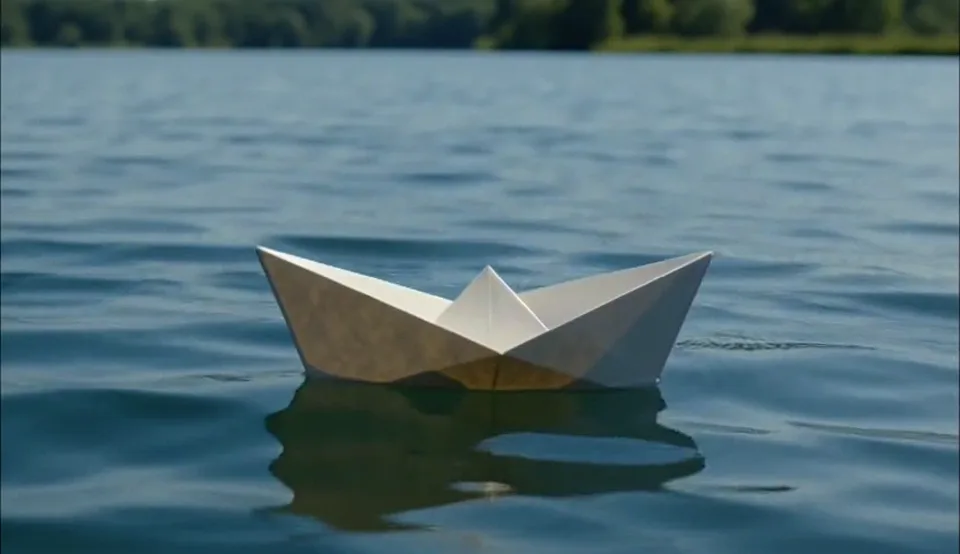


A paper boat. A quiet lake. A little camera motion.
TEXT → VIDEOYOUR NEXT TAKE
What do you want to bring to life?
Describe a scene, choose a model, and generate a video in this space.
Sign in to createMADE ON BREAKBOUND
Same prompt. Three perspectives.
Real model outputs from one shared prompt. Play a clip, then try your own version.
THE PROMPTA small paper boat drifting across a quiet blue lake in daylight. Gentle camera motion.
Examples are silent previews of generated clips. Your results will vary.
- 01
Describe the shot
Start with a subject, an action and a setting. Add the lighting, mood and camera movement you have in mind.
- 02
Choose your model
Try a different visual approach with each model. Select a supported duration, resolution and audio option.
- 03
Generate. Watch. Refine.
Preview your clip here, download it, or adjust your prompt for the next take. Each generation is billed separately.
FOLLOW YOUR CURIOSITY
Give your next idea a moving start.
Start with a mood, a product concept, or a world you want to explore.
 Prompt inspiration
Scenes with a sense of place
Build an establishing shot, explore a new setting, or test a camera move before you develop the rest of the story.
Use this idea Prompt inspiration
Product ideas in motion
Explore lighting, materials and motion for a product concept. Iterate on the visual direction before a full production.
Use this idea Prompt inspiration
A world for your next story
Turn a written scene into a visual starting point, then keep the script and later shots together in a creative project.
Use this ideaKEEP THE STORY TOGETHER
One idea can become a whole project.
Write a script, add visual references, and create the next shot with shared context. Keep your writing, images and videos in one creative timeline.
Open Creative projects- 01Write the scene
Shape the story with your writing model.
- 02Add your references
Read uploaded media into reusable visual notes.
- 03Make the next shot
Review the combined prompt, then generate.
A FEW THINGS TO KNOW
AI video generator FAQ
From your first prompt to your next project.
Is this an unlimited AI video generator?
BreakBound gives you room to keep creating with pay-as-you-go generation. It is not a free, unlimited-generation plan: each request uses wallet credit, and model duration, resolution, prompt limits and availability still apply. Check the current model pricing before you generate.
How do I turn text into an AI video?
Describe your subject, what happens, the setting and the camera movement. Choose an available video model, duration and resolution, then generate. Your result appears on this page, where you can preview it and download the clip.
Which AI video models can I use?
The live model selector shows the models currently available on BreakBound. The examples here were generated with MiniMax H3 Max, Seedance 1.5 Pro and Longcat Distilled. Models differ in motion, style, audio support, duration and cost.
Can I use images or videos as creative references?
Yes. In Creative projects, you can upload an image or video and ask a compatible model to read it. The saved observations can guide your script and video prompt. This page generates video from text; reference observations are not the same as sending the original frames to the video model. Media reading is charged separately.
How long can an AI-generated video be?
Length depends on the selected model. For example, Longcat Distilled supports clips up to 30 seconds, while Seedance 1.5 Pro supports up to 12 seconds in the current integration. The generator shows supported durations. Create separate shots for longer stories and assemble them in your video editor.
Does generated video include sound?
Some models include audio, some offer it as an option, and others generate silent video. The controls show what the selected model supports. The demonstration clips on this page are silent previews.
Can I use the video generator through an API?
Yes. Sign in to the console to create an API key, and open the model library for the selected model’s endpoint and request example. Your website and API usage draw from the same account wallet.
YOUR IMAGINATION. IN MOTION.
There is always another take.
Create a videoChoose your model. Pay for what you generate.